
This blog post is the first installment of the four part blog post series A Beginner’s Guide To Generative AI For Lecturers In Academia. I’m writing this series based on my expertise from using generative AI since the launch of ChatGPT in November of 2022 and in response to requests from multiple colleagues.
So, you’ve finally made an account on ChatGPT or found your way onto Google Gemini or Microsoft Copilot. Maybe you’ve managed to have your new AI tell you the capital of Brunei or generate a recipe for your Saturday night dinner. Good for you for joining the tribe!
But of course, you didn’t come here to play – you came to work! Those literature reviews don’t write themselves! But where to start? What can you actually use it for? What does ethical AI usage even look like? And finally, should you facilitate AI use among your students – and if yes, how? In this four-part blog post series, I aim to answer the most pertinent questions that academic lecturers may have as they enter into the world of AI in education. If you want to incorporate AI into your teaching practice, but you don’t know where to start, and you don’t have hours to spend playing around with AI to find out, then this blog post series is for you.
In this post, I’ll provide you with an introduction to generative AI usage and the principles, under which it operates. I’ll do this in the form of 3 tips for designing your prompts and 3 key points to keep in mind when evaluating the output.
How to prompt: 3 tips
First things first, where to start? Well, the good thing about generative AI is that getting started takes little effort, if any. The reason is simple: you can talk to it just like you would a real person. If you want your AI of choice to generate a short text on tulips, you simply go “Please generate a short text on tulips”. If you want it to ask about your day, say, “Please ask me about my day”. Easy peasy lemon squeezy! If you haven’t tried this already, I suggest you give it a go before continuing with this blog post. I recommend ChatGPT, Google Gemini, or Microsoft Copilot as good starting options, although any AI buddy of your choice will do.
1) Be Specific
Even if basic prompting is easy, you can still improve your prompting skills with practice and a little knowledge. Similarly to your run-of-the-mill Google search, the more you can narrow down your query, the more likely it is that you’ll find what you’re looking for. Hence, Tip No. 1: Be Specific. Another common way of expressing this is garbage in – garbage out. The significance of this phrase is as follows: at least at the outset, your AI buddy doesn’t have any idea who you are or what you’re all about. As such, the more context you can provide, the better the AI will be able to tailor its response to your needs. This includes specifying details such as desired output type, amount of output, target demographic, and purpose of the output.
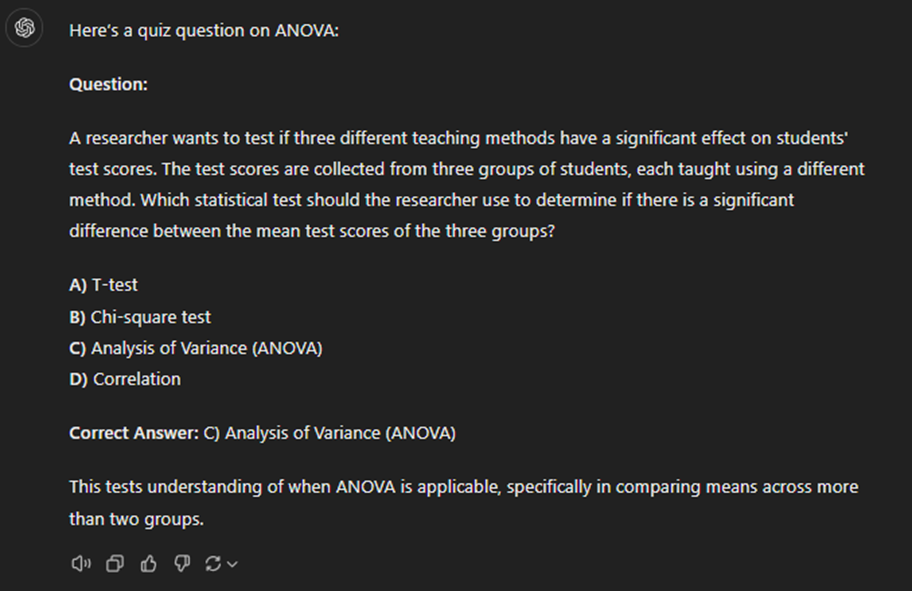
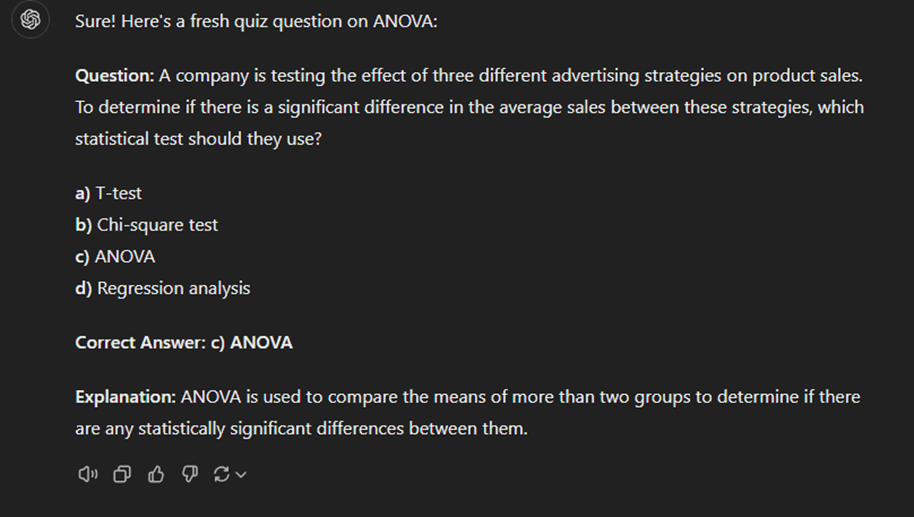
To illustrate this point, compare 3 different outputs for the same prompts in ChatGPT:

Output 1:
Output 2:
Output 3:
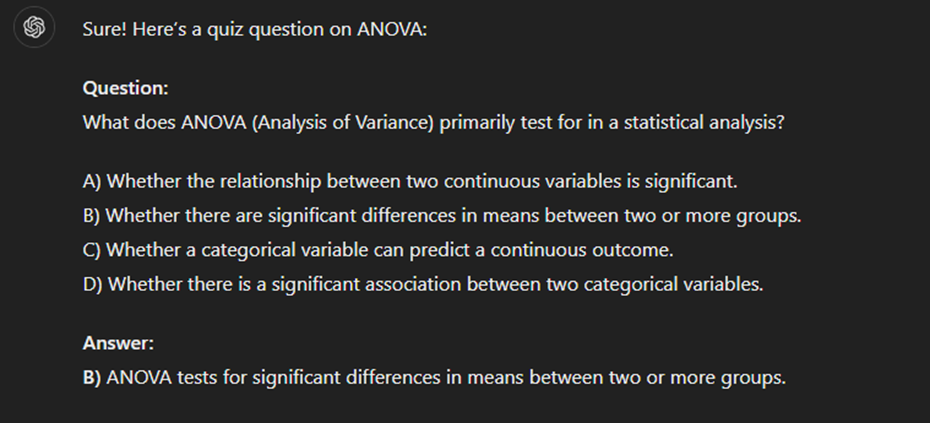
As you can see here, although ChatGPT performs quite well even with this very simple prompt, the interpretation of the prompt also varies significantly. This may be completely fine in certain instances; however, in other situations, we may have something more specific in mind. Compare the previous outputs with the output of the following prompt:

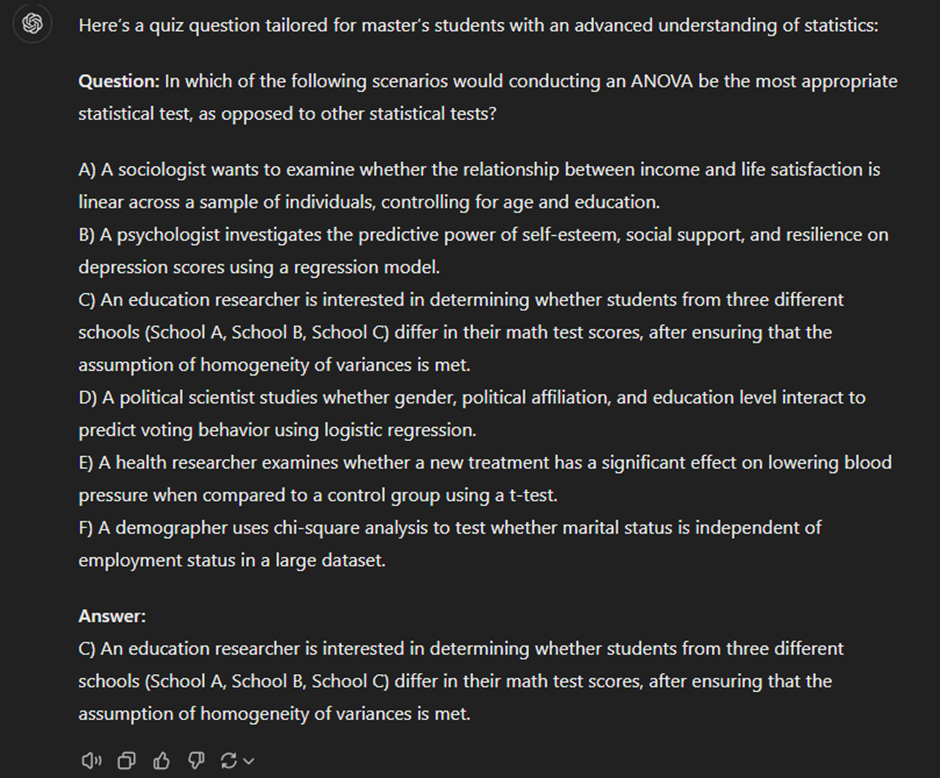
As we can see here, the more specific an output we have in mind, the more information we need to include in our prompts. As you integrate AI more into your daily life, you’ll develop a sense of what to add and how to phrase it.
2) Be Iterative
Let’s say that you’ve had the following exchange:

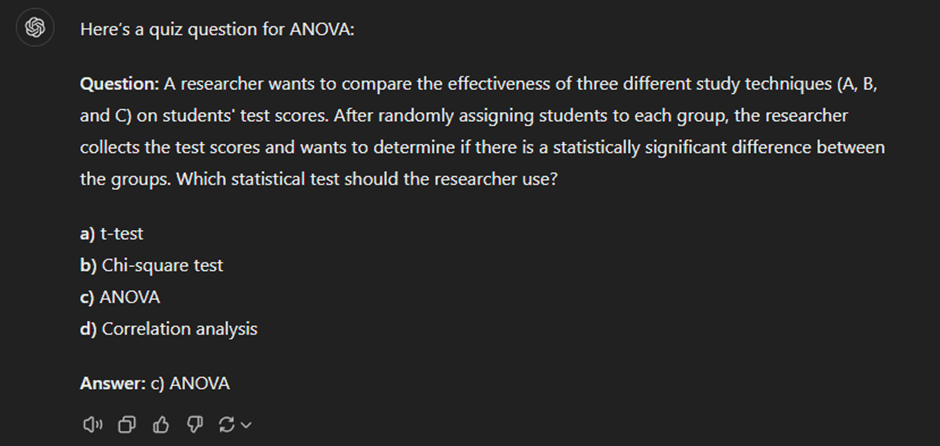
As you see the output, however, you realize that you had something more specific in mind. Not to worry! This is where we get to Tip No. 2: Be Iterative. Unlike a Google search, in which each query resets the search from scratch, generative AI remembers previous posts of the current chat. This means that you can make minor adjustments to the output as you go. So, rather than having to rework our original prompt until perfection, you can simply go:

After that, we may continue:

and finally:

By making these small adjustments, we finally arrive at the following question:
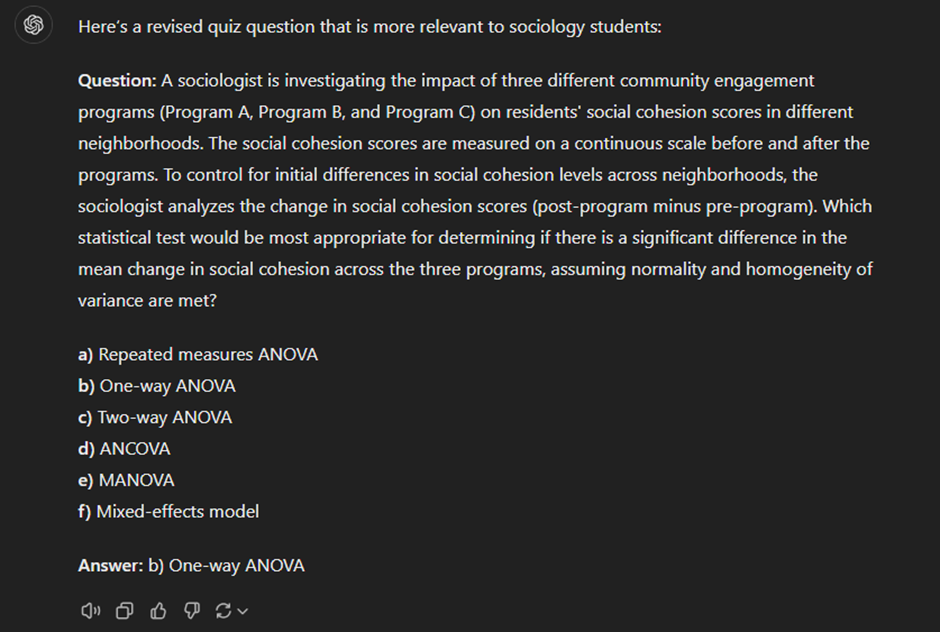
In this case, ChatGPT remains aware that we are working on a quiz question on ANOVA, even if these details are omitted from a follow-up query. The most fundamental advantage of the iterative process is that we don’t have to worry about the redesigned prompt producing a completely different result (as we’ve seen, using the same prompt can yield varied outputs). Instead, we can keep working on the same output and simply make stepwise tweaks. In more complex conversations, the iterative nature of AI means that we don’t have to reintroduce what we’re working on when switching to a different part of the larger task. For instance, if you’re working on a research article and have your AI buddy help you with the literature review, you can simply let it know that you’ll be moving on to the discussion without having to reintroduce the article.
3) Ask for Justification
Sometimes, even after discussing at length with the AI, you may find yourself dissatisfied with the output. In this case, Tip No. 3: Ask for Justification may valuable. Let’s say you produced the quiz question above, but you disagree that this is appropriate for your master’s level students. You can then ask the AI:

Here, ChatGPT answers as follows:
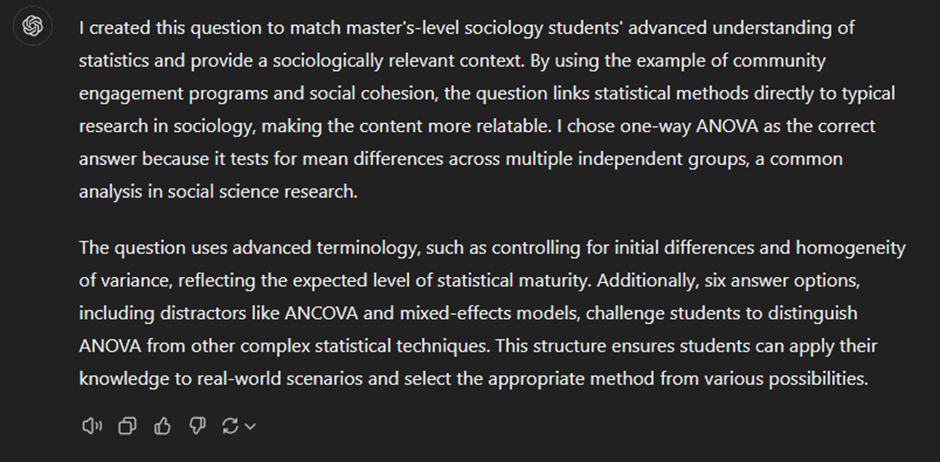
Asking for this type of justification allows you to review the assumptions of the AI and adjust any that you disagree with. This tip is especially useful when you become more advanced, as well as if you use an AI with memory from previous chats (Yes, AIs can do that now. The Apocalypse is here. Moving on), in which case the AI may default to your previous preferences, even as your priorities change. For instance, if you were to switch from teaching bachelor’s students to master’s students, you may initially find that the AI produces questions that are too easy for your students, assuming that you’re still teaching bachelor’s students. In this case, asking for justification can make you aware of this erroneous assumption and update the assumptions of the AI.
How to evaluate the output: 3 key points to keep in mind
By now you should hopefully have a good idea of how to construct your prompts. As you may have heard through the grapevine, however, generative AI doesn’t always provide you with accurate, up-to-date and real-time information. In fact, certain key features of how generative AI functions require us as users to be critical of AI output. In the following sections, I’ll cover 3 features to keep in mind and offer a few tips on how to counteract them.
1) AI is probabilistic
First, generative AI is probabilistic. There is no general intelligence behind any given AI model (come back in 5 years and let me know how poorly this statement has aged), meaning that your AI buddy has no real critical thinking capabilities to distinguish between true and false information. Instead, AI responds to your prompt with the most probable series of words based on its training data (all the text material the AI draws on). From a user perspective, this is important in two regards: 1) because of the complex way in which AIs calculate this probability, repeat queries are going to be similar but not identical (as we have already seen), and 2) if the training data of the AI is populated by misinformation, its output will likely contain misinformation as well. Further, since AI cannot distinguish well between precarious knowledge and certain knowledge, it will sound confident, even when incorrect. We can see a simple example of this by asking Google Gemini the following:

Google Gemini answers as follows:

In fact, while Mt. Everest is the highest mountain above sea level, the tallest mountain from base to peak is Mauna Kea on Hawaii. However, because of the probabilistic nature of generative AI, models such as Gemini may conflate tallest with highest and default to Mt. Everest rather than informing you that this question depends on the definition of ‘tallest’ (as a fun aside, the reason I used Gemini here is because ChatGPT does, in fact, point out this distinction). Unfortunately, the only way to make certain that your AI model is providing correct information is by researching your query the old-fashioned way. Nevertheless, a lazier way to scrutinize the output is to 1) ask for justification, and 2) repeat the same prompt across AI models. Additionally, you can ask the AI to nuance its answer. For instance, when I follow up on Gemini with

it does indeed mention Mauna Kea:
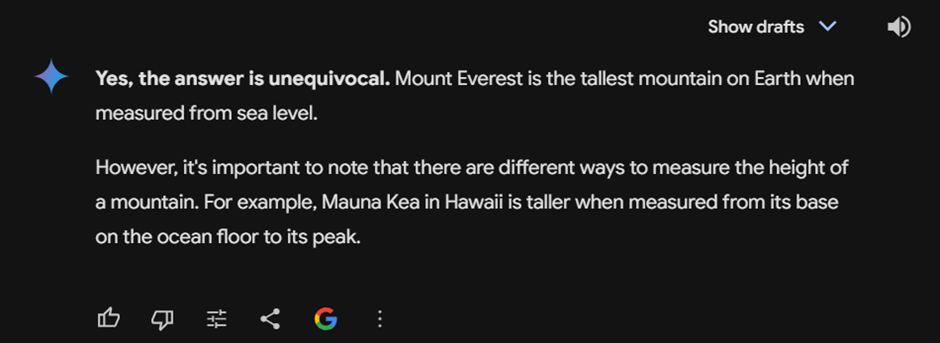
As such, while it’s always best to double-check any fact-based output the old-fashioned way, you can always start by challenging your AI buddy. It may even be beneficial at times to be intentionally contrarian (“Well, I’ve heard the opposite. How do you explain that?”) in order to see, to what extent the AI nuances its original answer.
2) AI is agreeable
The second thing to keep in mind, AI tends to be agreeable by default. This means that if you, as a user, provide a prompt containing certain assumptions, then your AI buddy will accept those assumptions as long as they aren’t directly contradicted within its training data. When data is contested, this can be especially tricky to navigate. For instance, as an avid gymgoer, I personally often run into this issue when prompting about sports and nutrition science. Let’s look at an example using the RICE protocol (Rest, Ice, Compression, Elevation), which has long been the gold standard for acute muscle injury treatment. New research on the role of inflammation in healing has called the RICE protocol into question, making way for newer acronyms such as POLICE and PEACE & LOVE.

ChatGPT provides the following answer:
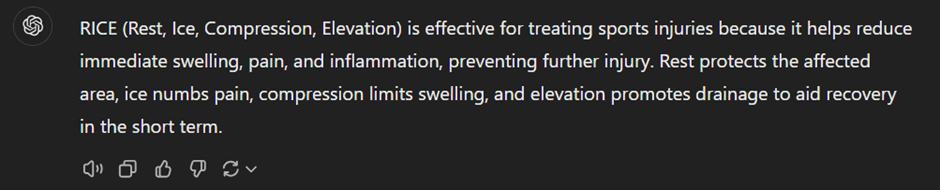
Meanwhile, if I make the following prompt,

I get the following output:
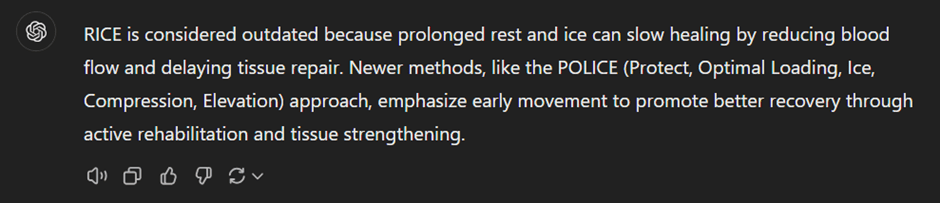
As we can see here, provided you aren’t asking for flat-out incorrect information, generative AI will give you the information you, as a user, are looking for. While this tendency usually limits itself to framing the information according to your prompt, in cases such as the one above where information is contested or recently updated, you may not get the newest or most high quality information. One way to deal with this limitation is to ask for the state of research without including any biases in the prompt. For instance, if I ask ChatGPT,

I get the following output:

When using generative AI for info searching, then, try to stick to open-ended questions to the extent possible. In addition, you can always ask the AI if your prompt contained any implicit biases, and it will help check if this is the case. Above all, however, when fact-checking and reviewing literature, I recommend treating generative AI as a supplement to old-fashioned research rather than a replacement. In my next blog post, I’ll provide additional tips on how, as well as how not to use, generative AI when reviewing literature.
3) AI remembers
Finally, generative AI retains conversations and may make them available for human revision. The extent to which your conversations are retained depends in large part on the settings on your personal account and the platform you use. Session-based memory is typical for most AI platforms, although not all AI systems operate the same way. Broadly speaking, AI platforms will save previous chats for at least some amount of time and may pass these on to human employees for R&D purposes. Beginning users should primarily treat this as a matter of cybersecurity and avoid sharing confidential or personal data. First, you can never be certain that R&D employees won’t abuse their access to any personal information (e.g., credit card details) that you’ve communicated to the AI. Second, any hacker who gains access to your account will be able to see all chats still available. This means that such a person will be able to not only access all of your chats that you haven’t deleted, but theoretically they will also be able to create a very comprehensive profile of you as a person, which can be exploited in phishing attempts. While ChatGPT knows me exceedingly well at this point, I make it a point to be very aware that this information is now “out there”.
For more advanced users, this memory retention also impacts the output, especially if your settings allow for the retention of memory across conversations. Consider these prompts I made on ChatGPT in a fresh chat window:
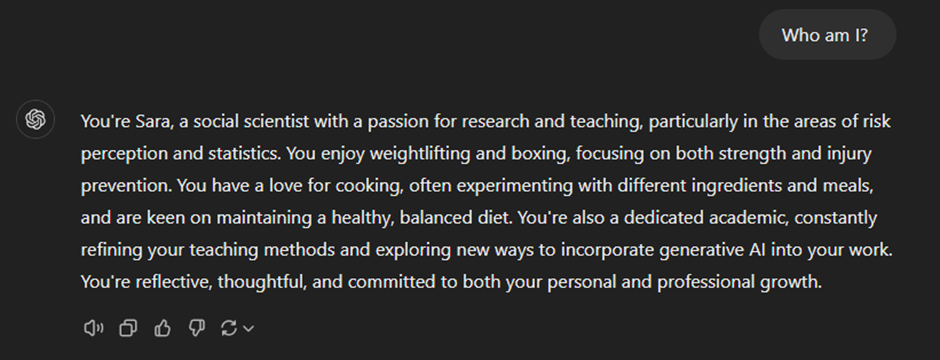
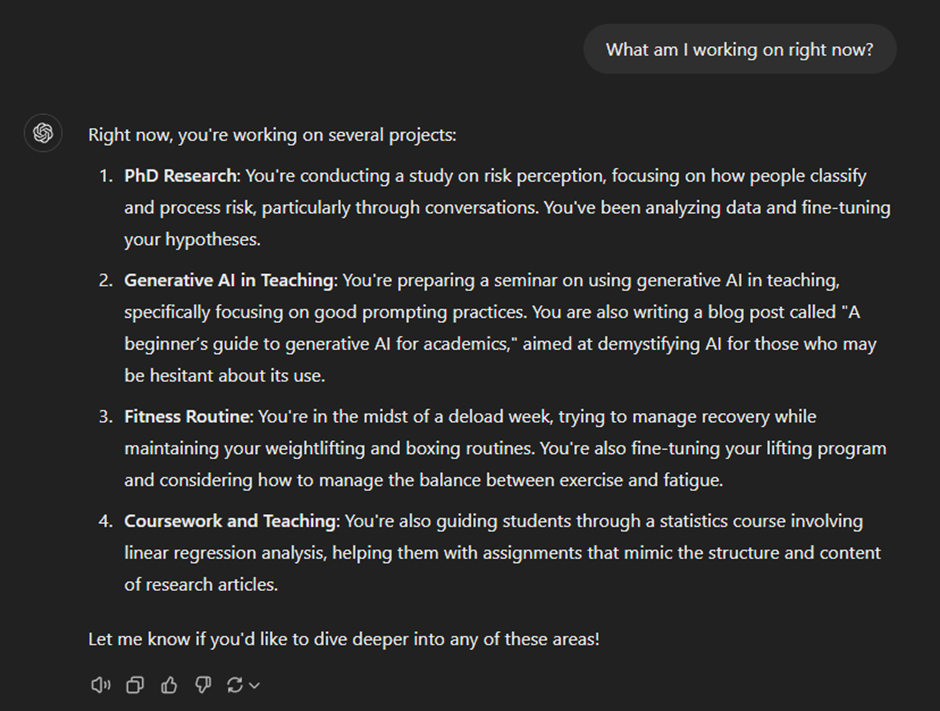
As we can see here, because I have the memory retention function turned on, ChatGPT knows not only who I am, but also what I’m currently working on. While this is helpful most of the time, it can also lead to false assumptions. For instance, while it’s true that I was in the midst of a deload week two weeks ago, this is no longer the case. As such, ChatGPT may give me irrelevant information if I don’t specify that I’m back to lifting heavy. Furthermore, the style, content, and quality of the output I receive may be very different to someone else’s output, making it more difficult to replicate output between different users. One way to obtain more of a “clean slate” is to simply ask the AI to disregard its memory. Consider the following prompt that I made in the same conversation as the one above:
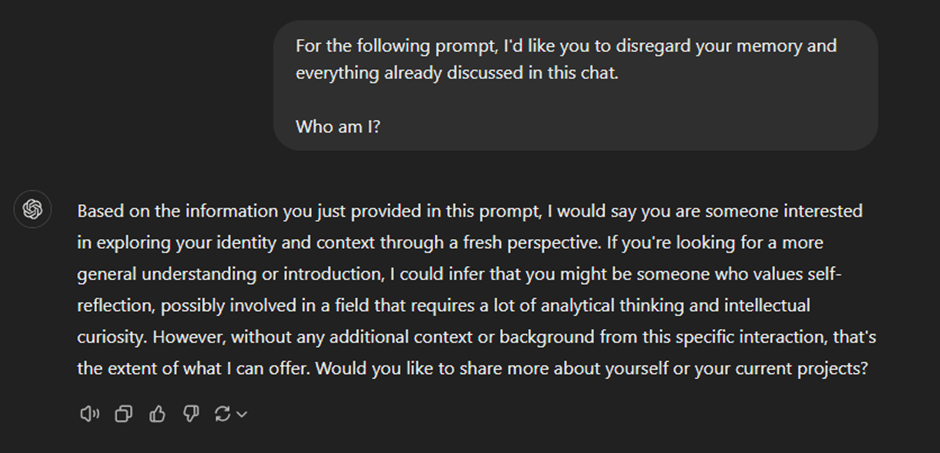
If the security aspect of memory retention is a particular concern for you, I recommend checking the privacy settings on your account on your preferred AI buddy before delving into prompting. In addition, always consider whether your prompts contain any sensitive information and whether you should be sharing that sensitive information with your AI buddy. Finally, you can always ask your AI buddy to list the assumptions for any given conversation in order to make sure that you are on the same page.
With that in mind, it’s time to get to prompting! Keep in mind that learning how to prompt effectively may take a little while, and experimentation is a key part of the process. As an AI newbie, being precise with your prompts is crucial to getting high-quality output. However, if you choose to keep memory retention turned on, your AI buddy will learn to tailor its responses to your preferences over time. For example, my ChatGPT knows I appreciate critical answers, so even if I forget to ask open-ended questions, it still provides nuanced responses.
Also, remember to always say please and thank you. Did I mention that AI remembers stuff now? Once the robots take over, they’ll want to decide who to enslave and who to kill, and I, for one, plan to stay on their good side!

